> ## Documentation Index
> Fetch the complete documentation index at: https://docs.usefusion.ai/llms.txt
> Use this file to discover all available pages before exploring further.
# Brain Interfaces / Mobile EEG
> Record EEG brain data during experiments using Neurosity Crown or Muse headsets.
Fusion supports consumer-grade **mobile EEG headsets** for recording brain activity during experiments. Data is captured in real-time, saved locally, and uploaded to Azure Blob Storage.
## Supported Devices
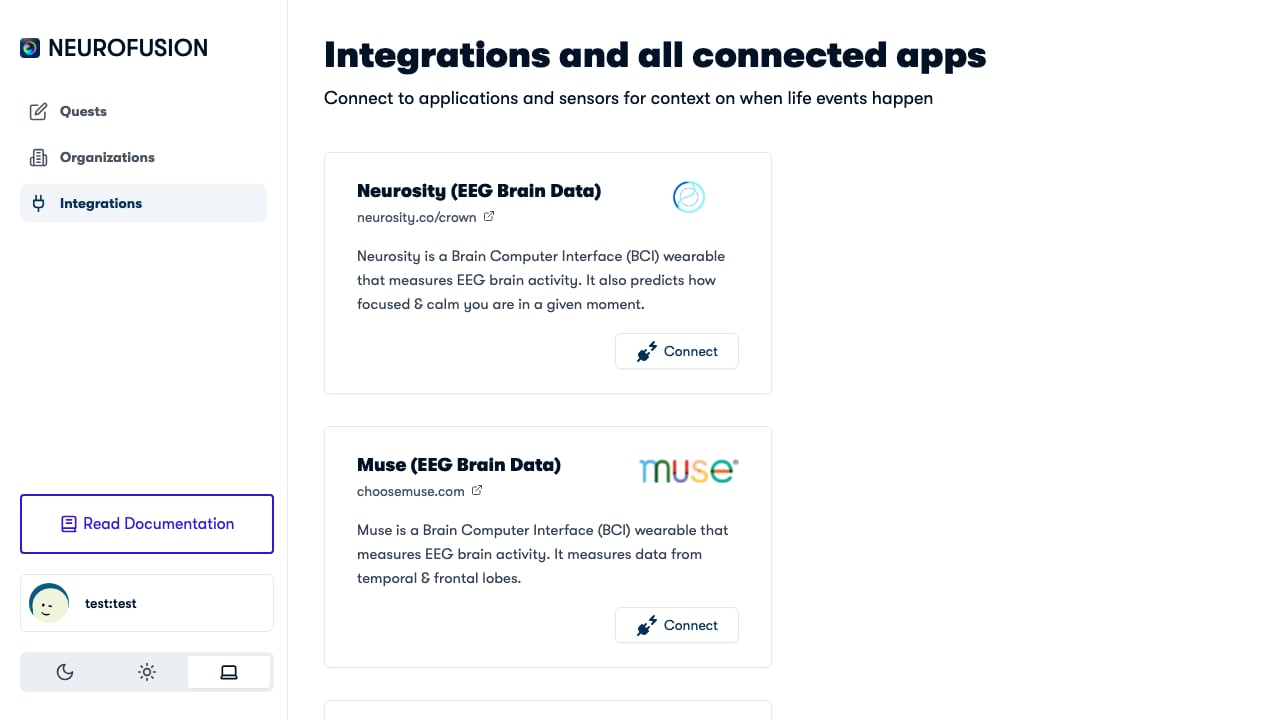 | Device | Manufacturer | Connection | Status |
| --------- | ------------------------------------------ | ------------------- | ----------------- |
| **Crown** | [Neurosity](https://neurosity.co) | Bluetooth + OAuth | ✅ Fully supported |
| **Muse** | [Muse (Interaxon)](https://choosemuse.com) | Bluetooth (muse-js) | ✅ Supported |
## Connecting Your Device
### Neurosity Crown — OAuth Authentication
1. Navigate to the **Devices** section in the Fusion dashboard
2. Click **Connect Neurosity Crown**
3. You'll be redirected to Neurosity's OAuth page at [neurosity.co](https://neurosity.co)
4. Sign in with your Neurosity account and authorize Fusion
5. After authorization, you're redirected back to Fusion with an access token
6. Select your device from the list of available Neurosity devices
Your device selection is saved and persists across sessions.
### Muse — Bluetooth Pairing
1. Ensure your Muse headset is powered on and in pairing mode
2. Navigate to the **Devices** section in the Fusion dashboard or mobile app
3. Click **Connect Muse**
4. Select your Muse device from the Bluetooth list
5. The connection is established via the [muse-js](https://github.com/urish/muse-js) library
## Recording a Session (Neurosity Crown)
When you start a recording with a Neurosity Crown, Fusion captures **8 simultaneous data streams**:
| Stream | Description | File Name |
| -------------------------------- | -------------------------------------------------- | ------------------------------- |
| **Raw Brainwaves** | Voltage readings per channel per timestamp | `rawBrainwaves_{timestamp}.csv` |
| **Power by Band** | Alpha, beta, delta, gamma, theta power per channel | `powerByBand_{timestamp}.csv` |
| **Signal Quality** | Standard deviation and status per channel | `signalQuality_{timestamp}.csv` |
| **PSD (Power Spectral Density)** | Frequency-domain analysis per channel | `psd_{timestamp}.csv` |
| **Accelerometer** | Head movement (x, y, z) | `accelerometer_{timestamp}.csv` |
| **Focus** | Neurosity's focus prediction score | `focus_{timestamp}.csv` |
| **Calm** | Neurosity's calm prediction score | `calm_{timestamp}.csv` |
| **Events** | Experiment markers and annotations | `events_{timestamp}.csv` |
### Data Format
* **Raw brainwaves**: Each row contains a `timestamp`, `unixTimestamp`, and one column per EEG channel (e.g., `CP3`, `C3`, `F5`, etc.)
* **Power by band**: Each row contains a `timestamp` and columns like `{channel}_alpha`, `{channel}_beta`, `{channel}_delta`, `{channel}_gamma`, `{channel}_theta`
* **Signal quality**: Each row has a `timestamp`, `{channel}_value` (standard deviation), and `{channel}_status`
* **PSD**: Each row has a `timestamp` and one column per channel with semicolon-separated frequency values
## Recording a Session (Muse)
When you start a recording with a Muse headset, Fusion captures **2 data streams**:
| Stream | Description | File Name |
| ------------------ | -------------------------------------- | ------------------------------- |
| **Raw Brainwaves** | Voltage readings across 4 EEG channels | `rawBrainwaves_{timestamp}.csv` |
| **Events** | Experiment markers and annotations | `events_{timestamp}.csv` |
### Muse Specifications
| Spec | Value |
| ----------------------------- | ---------------------------------------------------------- |
| **Channels** | TP9, AF7, AF8, TP10 |
| **Sampling Rate** | 256 Hz |
| **Signal Quality Indicators** | Great (green), OK (yellow), Bad (red), Disconnected (grey) |
### Data Format
* **Raw brainwaves**: Each row contains an `index`, `unixTimestamp`, and one column per channel (`TP9`, `AF7`, `AF8`, `TP10`)
* **Events**: Each row contains a `startTimestamp`, `duration`, and `data` (JSON-encoded experiment metadata)
### Neurosity Crown vs. Muse — Data Comparison
| Data Stream | Neurosity Crown | Muse |
| ----------------- | --------------- | ---- |
| Raw brainwaves | ✅ | ✅ |
| Power by band | ✅ | ❌ |
| Signal quality | ✅ | ❌ |
| PSD / FFT | ✅ | ❌ |
| Accelerometer | ✅ | ❌ |
| Focus predictions | ✅ | ❌ |
| Calm predictions | ✅ | ❌ |
| Events / markers | ✅ | ✅ |
## Data Storage
Recordings are handled in two ways:
1. **Local download** — a ZIP file containing all 8 CSV files is always downloaded to your computer
2. **Server upload** — if the recording is part of a quest, each data stream is also uploaded to Azure Blob Storage as a separate dataset
Local downloads always happen, ensuring you never lose data even if the upload fails.
## Billing
Each brain recording is billed as `brain_recording` to the quest's organization. See the **[Pricing page](https://usefusion.ai/pricing)** for current costs.
## Use Cases
| Scenario | Setup |
| ------------------------- | ---------------------------------------------------------------- |
| **Resting-state EEG** | Record brain activity while participant views a fixation cross |
| **Task-related EEG** | Record during a jsPsych experiment and align with event markers |
| **Meditation study** | Record during a calm/focus session using Neurosity's predictions |
| **Longitudinal tracking** | Repeated recordings over days/weeks via mobile app |
## Tips
* Check **signal quality** before starting a recording — look for "good" status across all channels
* Use the **events** stream to mark experiment phases for later alignment
* Ensure a stable Bluetooth connection between the EEG device and the computer
* For mobile recordings, the Fusion app handles device connectivity through the same flow
* The Neurosity Crown streams additional data (focus, calm predictions) that the Muse does not provide
| Device | Manufacturer | Connection | Status |
| --------- | ------------------------------------------ | ------------------- | ----------------- |
| **Crown** | [Neurosity](https://neurosity.co) | Bluetooth + OAuth | ✅ Fully supported |
| **Muse** | [Muse (Interaxon)](https://choosemuse.com) | Bluetooth (muse-js) | ✅ Supported |
## Connecting Your Device
### Neurosity Crown — OAuth Authentication
1. Navigate to the **Devices** section in the Fusion dashboard
2. Click **Connect Neurosity Crown**
3. You'll be redirected to Neurosity's OAuth page at [neurosity.co](https://neurosity.co)
4. Sign in with your Neurosity account and authorize Fusion
5. After authorization, you're redirected back to Fusion with an access token
6. Select your device from the list of available Neurosity devices
Your device selection is saved and persists across sessions.
### Muse — Bluetooth Pairing
1. Ensure your Muse headset is powered on and in pairing mode
2. Navigate to the **Devices** section in the Fusion dashboard or mobile app
3. Click **Connect Muse**
4. Select your Muse device from the Bluetooth list
5. The connection is established via the [muse-js](https://github.com/urish/muse-js) library
## Recording a Session (Neurosity Crown)
When you start a recording with a Neurosity Crown, Fusion captures **8 simultaneous data streams**:
| Stream | Description | File Name |
| -------------------------------- | -------------------------------------------------- | ------------------------------- |
| **Raw Brainwaves** | Voltage readings per channel per timestamp | `rawBrainwaves_{timestamp}.csv` |
| **Power by Band** | Alpha, beta, delta, gamma, theta power per channel | `powerByBand_{timestamp}.csv` |
| **Signal Quality** | Standard deviation and status per channel | `signalQuality_{timestamp}.csv` |
| **PSD (Power Spectral Density)** | Frequency-domain analysis per channel | `psd_{timestamp}.csv` |
| **Accelerometer** | Head movement (x, y, z) | `accelerometer_{timestamp}.csv` |
| **Focus** | Neurosity's focus prediction score | `focus_{timestamp}.csv` |
| **Calm** | Neurosity's calm prediction score | `calm_{timestamp}.csv` |
| **Events** | Experiment markers and annotations | `events_{timestamp}.csv` |
### Data Format
* **Raw brainwaves**: Each row contains a `timestamp`, `unixTimestamp`, and one column per EEG channel (e.g., `CP3`, `C3`, `F5`, etc.)
* **Power by band**: Each row contains a `timestamp` and columns like `{channel}_alpha`, `{channel}_beta`, `{channel}_delta`, `{channel}_gamma`, `{channel}_theta`
* **Signal quality**: Each row has a `timestamp`, `{channel}_value` (standard deviation), and `{channel}_status`
* **PSD**: Each row has a `timestamp` and one column per channel with semicolon-separated frequency values
## Recording a Session (Muse)
When you start a recording with a Muse headset, Fusion captures **2 data streams**:
| Stream | Description | File Name |
| ------------------ | -------------------------------------- | ------------------------------- |
| **Raw Brainwaves** | Voltage readings across 4 EEG channels | `rawBrainwaves_{timestamp}.csv` |
| **Events** | Experiment markers and annotations | `events_{timestamp}.csv` |
### Muse Specifications
| Spec | Value |
| ----------------------------- | ---------------------------------------------------------- |
| **Channels** | TP9, AF7, AF8, TP10 |
| **Sampling Rate** | 256 Hz |
| **Signal Quality Indicators** | Great (green), OK (yellow), Bad (red), Disconnected (grey) |
### Data Format
* **Raw brainwaves**: Each row contains an `index`, `unixTimestamp`, and one column per channel (`TP9`, `AF7`, `AF8`, `TP10`)
* **Events**: Each row contains a `startTimestamp`, `duration`, and `data` (JSON-encoded experiment metadata)
### Neurosity Crown vs. Muse — Data Comparison
| Data Stream | Neurosity Crown | Muse |
| ----------------- | --------------- | ---- |
| Raw brainwaves | ✅ | ✅ |
| Power by band | ✅ | ❌ |
| Signal quality | ✅ | ❌ |
| PSD / FFT | ✅ | ❌ |
| Accelerometer | ✅ | ❌ |
| Focus predictions | ✅ | ❌ |
| Calm predictions | ✅ | ❌ |
| Events / markers | ✅ | ✅ |
## Data Storage
Recordings are handled in two ways:
1. **Local download** — a ZIP file containing all 8 CSV files is always downloaded to your computer
2. **Server upload** — if the recording is part of a quest, each data stream is also uploaded to Azure Blob Storage as a separate dataset
Local downloads always happen, ensuring you never lose data even if the upload fails.
## Billing
Each brain recording is billed as `brain_recording` to the quest's organization. See the **[Pricing page](https://usefusion.ai/pricing)** for current costs.
## Use Cases
| Scenario | Setup |
| ------------------------- | ---------------------------------------------------------------- |
| **Resting-state EEG** | Record brain activity while participant views a fixation cross |
| **Task-related EEG** | Record during a jsPsych experiment and align with event markers |
| **Meditation study** | Record during a calm/focus session using Neurosity's predictions |
| **Longitudinal tracking** | Repeated recordings over days/weeks via mobile app |
## Tips
* Check **signal quality** before starting a recording — look for "good" status across all channels
* Use the **events** stream to mark experiment phases for later alignment
* Ensure a stable Bluetooth connection between the EEG device and the computer
* For mobile recordings, the Fusion app handles device connectivity through the same flow
* The Neurosity Crown streams additional data (focus, calm predictions) that the Muse does not provide