> ## Documentation Index
> Fetch the complete documentation index at: https://docs.usefusion.ai/llms.txt
> Use this file to discover all available pages before exploring further.
# Prompt Response Types
> The 5 response types available for prompts: Yes/No, Text, Number, Number Range, and Custom Options.
Each prompt requires a **response type** that determines how participants answer the question. There are 5 types available.
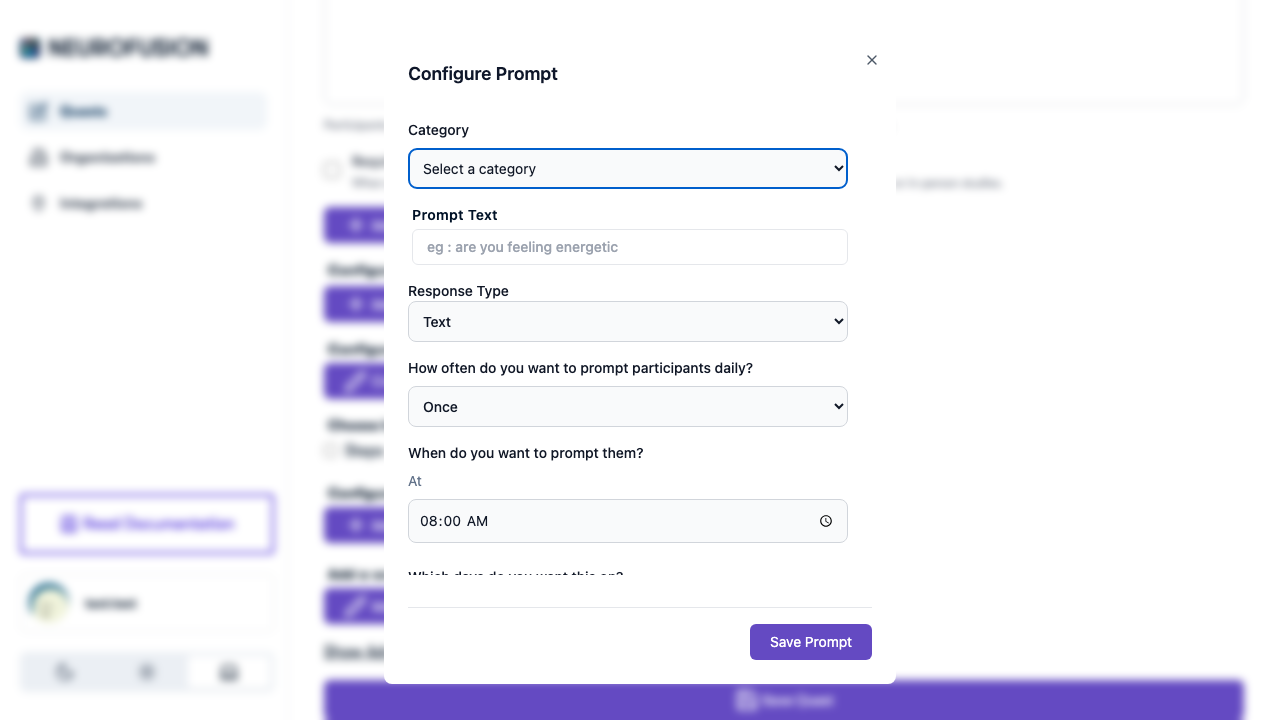 ## Yes/No
| | |
| -------------- | ------------------------------------------------- |
| **Type value** | `yesno` |
| **UI** | Two radio buttons: "Yes" and "No" |
| **Best for** | Binary screening, daily check-ins, habit tracking |
**Example**: *"Did you exercise today?"* → Yes / No
## Text
| | |
| -------------- | ---------------------------------------------------- |
| **Type value** | `text` |
| **UI** | Free-form text input field |
| **Best for** | Open-ended reflections, journaling, qualitative data |
**Example**: *"Describe your mood in a few words."* → (free text)
## Number
| | |
| -------------- | -------------------------------------------- |
| **Type value** | `number` |
| **UI** | Numeric input field |
| **Best for** | Counts, measurements, single numeric ratings |
**Example**: *"How many cups of coffee did you drink today?"* → 3
## Number Range
| | |
| -------------- | -------------------------------------------------------------- |
| **Type value** | `numberRange` |
| **UI** | Numeric input with configurable min/max bounds |
| **Best for** | Likert scales, pain scales, mood ratings, bounded measurements |
| **Defaults** | min = 0, max = 10 |
**Example**: *"Rate your stress level (1–10):"* → 7
### Configuring the Range
* **Min** — the lowest value participants can enter (default: `0`)
* **Max** — the highest value participants can enter (default: `10`)
* Validation: min must be less than max
Use Number Range instead of plain Number when you want to constrain participant responses to a bounded scale (e.g., 1–5 Likert, 0–100 VAS).
## Custom Options
| | |
| -------------- | ---------------------------------------------------------- |
| **Type value** | `customOptions` |
| **UI** | Radio buttons (single select) or checkboxes (multi-select) |
| **Best for** | Categorical data, multiple choice, forced-choice paradigms |
**Example**: *"How would you describe your sleep quality?"* → Poor; Fair; Good; Excellent
### Configuring Custom Options
1. **Enter options as a semicolon-separated list** — e.g., `Poor;Fair;Good;Excellent`
2. **"Allow multiple responses" toggle**:
* **ON** (single only = true) → participants pick **one** option (radio buttons)
* **OFF** (single only = false) → participants can pick **multiple** options (checkboxes)
Options are separated by **semicolons** (`;`) in prompts. This is different from onboarding questions, which use commas.
## Summary Table
| Type | UI Element | Configurable? | Example Use |
| --------------- | ---------------------- | --------------------------------- | -------------------------------- |
| `yesno` | Radio: Yes/No | No | "Did you meditate today?" |
| `text` | Text input | No | "How are you feeling?" |
| `number` | Number input | No | "Hours of sleep last night?" |
| `numberRange` | Number input (bounded) | Min/Max | "Rate your mood (1–10)" |
| `customOptions` | Radio or checkboxes | Options list, single/multi select | "What did you eat? (select all)" |
## Yes/No
| | |
| -------------- | ------------------------------------------------- |
| **Type value** | `yesno` |
| **UI** | Two radio buttons: "Yes" and "No" |
| **Best for** | Binary screening, daily check-ins, habit tracking |
**Example**: *"Did you exercise today?"* → Yes / No
## Text
| | |
| -------------- | ---------------------------------------------------- |
| **Type value** | `text` |
| **UI** | Free-form text input field |
| **Best for** | Open-ended reflections, journaling, qualitative data |
**Example**: *"Describe your mood in a few words."* → (free text)
## Number
| | |
| -------------- | -------------------------------------------- |
| **Type value** | `number` |
| **UI** | Numeric input field |
| **Best for** | Counts, measurements, single numeric ratings |
**Example**: *"How many cups of coffee did you drink today?"* → 3
## Number Range
| | |
| -------------- | -------------------------------------------------------------- |
| **Type value** | `numberRange` |
| **UI** | Numeric input with configurable min/max bounds |
| **Best for** | Likert scales, pain scales, mood ratings, bounded measurements |
| **Defaults** | min = 0, max = 10 |
**Example**: *"Rate your stress level (1–10):"* → 7
### Configuring the Range
* **Min** — the lowest value participants can enter (default: `0`)
* **Max** — the highest value participants can enter (default: `10`)
* Validation: min must be less than max
Use Number Range instead of plain Number when you want to constrain participant responses to a bounded scale (e.g., 1–5 Likert, 0–100 VAS).
## Custom Options
| | |
| -------------- | ---------------------------------------------------------- |
| **Type value** | `customOptions` |
| **UI** | Radio buttons (single select) or checkboxes (multi-select) |
| **Best for** | Categorical data, multiple choice, forced-choice paradigms |
**Example**: *"How would you describe your sleep quality?"* → Poor; Fair; Good; Excellent
### Configuring Custom Options
1. **Enter options as a semicolon-separated list** — e.g., `Poor;Fair;Good;Excellent`
2. **"Allow multiple responses" toggle**:
* **ON** (single only = true) → participants pick **one** option (radio buttons)
* **OFF** (single only = false) → participants can pick **multiple** options (checkboxes)
Options are separated by **semicolons** (`;`) in prompts. This is different from onboarding questions, which use commas.
## Summary Table
| Type | UI Element | Configurable? | Example Use |
| --------------- | ---------------------- | --------------------------------- | -------------------------------- |
| `yesno` | Radio: Yes/No | No | "Did you meditate today?" |
| `text` | Text input | No | "How are you feeling?" |
| `number` | Number input | No | "Hours of sleep last night?" |
| `numberRange` | Number input (bounded) | Min/Max | "Rate your mood (1–10)" |
| `customOptions` | Radio or checkboxes | Options list, single/multi select | "What did you eat? (select all)" |