> ## Documentation Index
> Fetch the complete documentation index at: https://docs.usefusion.ai/llms.txt
> Use this file to discover all available pages before exploring further.
# Prompt Scheduling
> Configure when and how often prompts are delivered to participants.
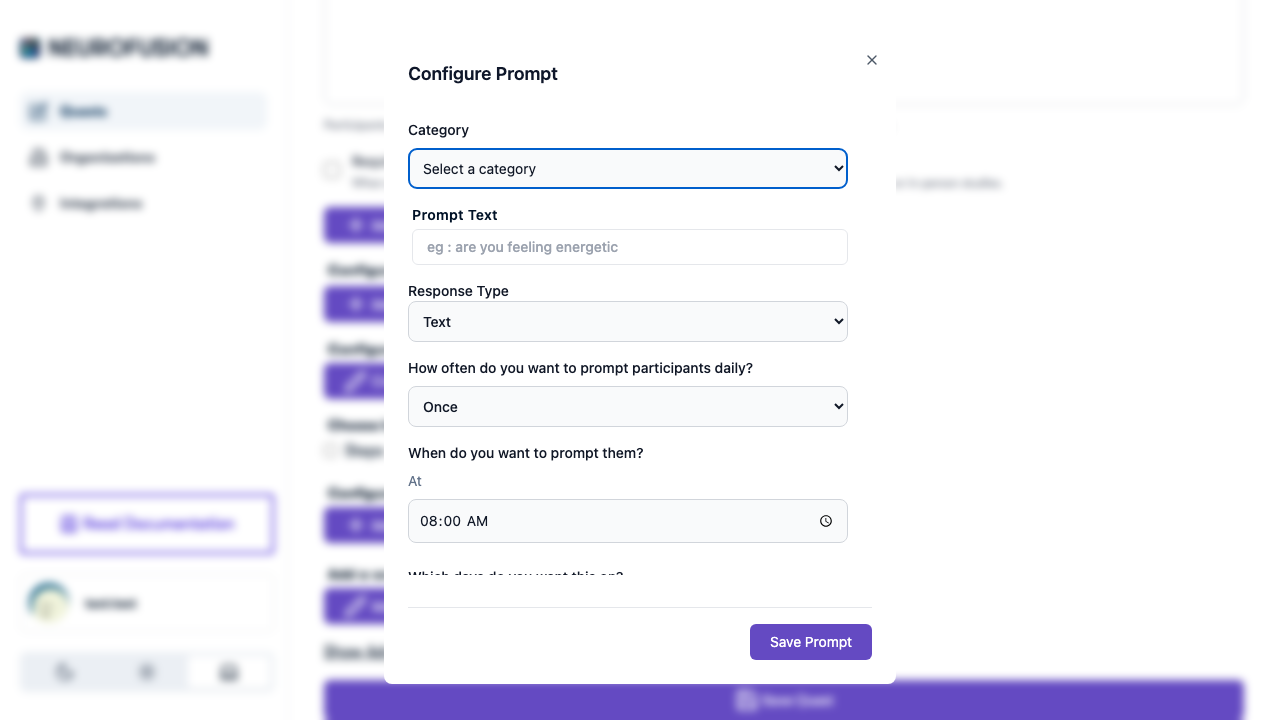
Each prompt has a schedule that controls when it's delivered to participants. Scheduling is configured along three dimensions: **active days**, **time window**, and **frequency**.
 ## Active Days
Choose which days of the week the prompt fires. Each day has an independent toggle.
| Day | Default |
| --------- | ------- |
| Monday | ✅ On |
| Tuesday | ✅ On |
| Wednesday | ✅ On |
| Thursday | ✅ On |
| Friday | ✅ On |
| Saturday | ✅ On |
| Sunday | ✅ On |
All days are enabled by default. Disable specific days for studies that only need data on certain days (e.g., weekdays only).
## Time Window
Set the time range during which the prompt can fire each day.
| Setting | Default | Format |
| -------------- | --------------- | ------ |
| **Start time** | `08:00` (8 AM) | HH:mm |
| **End time** | `22:00` (10 PM) | HH:mm |
* When frequency is set to **"Once"**, the picker shows a single **"At"** time, and the end time is automatically set to start + 2 minutes
* When frequency is anything else, the picker shows **"Between \[start] And \[end]"** with two time pickers
## Frequency
How many times per day the prompt fires within the time window.
| Label | Interval | Description |
| --------------------- | -------- | --------------------------------------------- |
| **Once** | — | Single notification at the specified time |
| **Every 30 minutes** | 30 min | Fires every 30 minutes within the time window |
| **Every hour** | 60 min | Fires every 60 minutes within the time window |
| **Every two hours** | 120 min | Fires every 2 hours within the time window |
| **Every three hours** | 180 min | Fires every 3 hours within the time window |
| **Every four hours** | 240 min | Fires every 4 hours within the time window |
## Notifications
Each prompt has a **notifications toggle**. When enabled, participants receive push notifications at the scheduled times to remind them to respond.
## Examples
### Daily Morning Check-in
> *"How did you sleep last night?"*
| Setting | Value |
| --------- | ---------- |
| Days | All 7 days |
| Frequency | Once |
| Time | 08:00 |
### Hourly Stress Rating (Weekdays)
> *"Rate your current stress level (1–10):"*
| Setting | Value |
| ---------- | ------------------ |
| Days | Monday–Friday only |
| Frequency | Every hour |
| Start time | 09:00 |
| End time | 17:00 |
### Twice-Daily Mood Tracking
> *"How are you feeling right now?"*
| Setting | Value |
| ---------- | ---------------- |
| Days | All 7 days |
| Frequency | Every four hours |
| Start time | 09:00 |
| End time | 21:00 |
Prompt defaults when creating a new prompt: all days enabled, start time 08:00, end time 22:00, frequency "Once", notifications on.
## Active Days
Choose which days of the week the prompt fires. Each day has an independent toggle.
| Day | Default |
| --------- | ------- |
| Monday | ✅ On |
| Tuesday | ✅ On |
| Wednesday | ✅ On |
| Thursday | ✅ On |
| Friday | ✅ On |
| Saturday | ✅ On |
| Sunday | ✅ On |
All days are enabled by default. Disable specific days for studies that only need data on certain days (e.g., weekdays only).
## Time Window
Set the time range during which the prompt can fire each day.
| Setting | Default | Format |
| -------------- | --------------- | ------ |
| **Start time** | `08:00` (8 AM) | HH:mm |
| **End time** | `22:00` (10 PM) | HH:mm |
* When frequency is set to **"Once"**, the picker shows a single **"At"** time, and the end time is automatically set to start + 2 minutes
* When frequency is anything else, the picker shows **"Between \[start] And \[end]"** with two time pickers
## Frequency
How many times per day the prompt fires within the time window.
| Label | Interval | Description |
| --------------------- | -------- | --------------------------------------------- |
| **Once** | — | Single notification at the specified time |
| **Every 30 minutes** | 30 min | Fires every 30 minutes within the time window |
| **Every hour** | 60 min | Fires every 60 minutes within the time window |
| **Every two hours** | 120 min | Fires every 2 hours within the time window |
| **Every three hours** | 180 min | Fires every 3 hours within the time window |
| **Every four hours** | 240 min | Fires every 4 hours within the time window |
## Notifications
Each prompt has a **notifications toggle**. When enabled, participants receive push notifications at the scheduled times to remind them to respond.
## Examples
### Daily Morning Check-in
> *"How did you sleep last night?"*
| Setting | Value |
| --------- | ---------- |
| Days | All 7 days |
| Frequency | Once |
| Time | 08:00 |
### Hourly Stress Rating (Weekdays)
> *"Rate your current stress level (1–10):"*
| Setting | Value |
| ---------- | ------------------ |
| Days | Monday–Friday only |
| Frequency | Every hour |
| Start time | 09:00 |
| End time | 17:00 |
### Twice-Daily Mood Tracking
> *"How are you feeling right now?"*
| Setting | Value |
| ---------- | ---------------- |
| Days | All 7 days |
| Frequency | Every four hours |
| Start time | 09:00 |
| End time | 21:00 |
Prompt defaults when creating a new prompt: all days enabled, start time 08:00, end time 22:00, frequency "Once", notifications on.